
As of late we’ve been working on initiatives related to collaboration with a partner organization. We have a high bandwidth metro-ethernet line to facilitate network communications and an AD forest trust so that we may grant permission to resources between our forests.
Last week I was tasked with working with my counterpart in the partner company to provide access to files on one of their servers to some of our people. He granted the proper permissions to the designated security group in our domain and provided me the path to the shared folder: \\Storage.PartnerCo.local\documents. I added my user account to the security group for testing. I found I was able to ping the server name but could not access the share. I got the dreaded “network path not found” error. I googled the error code but did not turn up anything helpful.
Adding confusion to the issue, my company has two servers stood up in this partner’s data center. These servers are on our domain. I was able to access the share just fine with my credentials from both of these servers. Huh? Is it a firewall problem? Nope, firewalls are wide open on both sides between our networks. Telnetting to SMB/CIFS ports works fine. So what exactly is going on here?
After emailing back and forth with PartnerCo’s Systems Engineer, I was made aware that Storage was just a DNS name. I was provided the host name and IP of the actual server hosting the share. I was then able to enumerate the share using the actual server name. I checked the properties of the share and found this.
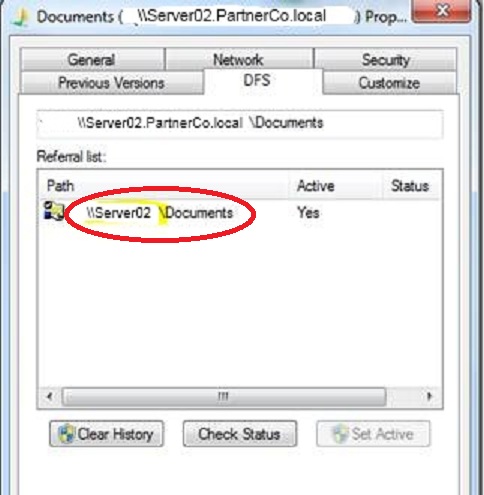
Aha! A DFS tab. And check out the path in the referral list. Notice it’s not a fully qualified domain name. So here’s how this goes…. Storage.PartnerCo.local is the DFS root name. When accessing the Documents share that way, the user is directed, behind the scenes, to the path \\Server02\Documents. For some reason Server02 is the only server with a referral. The problem here is the lack of FQDN in the path. My computer could not resolve it. No computer in my office could. However our two servers in PartnerCo’s data center COULD resolve it via NetBIOS! Wow.
It turns out they were are running DFS in Windows 2000 mode. Use of DNS names in referrals can only be turned on through a registry edit and existing shares must be RECREATED. Since clients will automatically try to append their own domain name to non-FQDN names to query DNS, I simply added a CNAME pointing Storage.MyCompany.local to Storage.PartnerCo.local and that worked right around this pesky problem.
Now can I have those two hours of my life back please?
 brute force IT
Consider it a learning experience and you won’t feel bad about losing those 2 hours!
Life is a learning experience! 🙂