Beware the Meraki vMX in Azure

The virtual Meraki MX (vMX) is no doubt a powerful and useful way to extend your Meraki SD-WAN into the public cloud. My company utilizes two of these virtual appliances in Azure, one in our production server network and one in our disaster recovery environment.

I cannot speak for the vMX in AWS, GCP or any other public cloud. But one major distinction between the vMX in Azure and a physical MX is that the vMX isn’t really a firewall. It’s meant to be used as a VPN concentrator, not the gateway to the Internet. It has a single interface for ingress and egress traffic. This aspect of the vMX, while crucial to understand, is not what this post is about.

Gotcha #1 – So you want your Remote Access VPN to actually work?

Our employees with laptops and other portable computers utilize VPN for remote access. When we migrated our servers to Azure it made sense to migrate the remote access VPN concentrator functionality from the physical MX in our main office to our vMX in Azure. We performed the setup on the vMX, but it would just not work. We came to find out that this functionality will only work if the vMX is deployed with a BASIC PUBLIC IP. The default public IP attached to the vMX is a standard. You cannot change this or attach a new interface once the vMX is deployed. In fact, you will not even see an option in the appliance setup wizard to deploy with a basic public IP. The answer to this conundrum cannot be found in Meraki’s published deployment guide for the vMX. It can be found deep in a Meraki forum post:
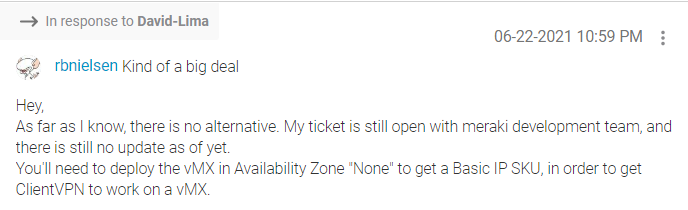
You read that right. To get the Basic IP (and a working RA VPN), you’ll need to keep the vMX from being deployed into an availability zone. Straightforward, huh?

Gotcha #2 – The location of your RADIUS server is important

This one also relates to the remote access VPN functionality. When we finally got the RA VPN working in our production environment, the RADIUS server was living in the same vNet as the vMX. And all was right with the world. Then we deployed a second vMX in our DR environment, in another Azure region and vNet. To test the RA VPN functionality, we attempted to utilize the production RADIUS server in the production vNet.

After submitting the user password, it would just time out. Packet captures from the vMX revealed the RADIUS requests from the vMX had source IPs from an unexpected public IP range. After much troubleshooting with Meraki support, it came to light that these public IPs are from the RADIUS testing functionality of Meraki wireless access points. This is some sort of a bug that manifests itself when the vMX is deployed in VPN concentrator mode. Meraki support suggested I could get this to work if I put the vMX in NAT mode. Supposedly new vMX’s are deployed in NAT mode by default anyway. So we put the vMX in NAT mode and sure enough, this resolved the issue. The RADIUS requests were now being sourced from the “inside” IP address of the vMX and reached the RADIUS server. And that’s when I noticed another gotcha……

Gotcha #3 – NAT Mode vMX Must be an Exit Hub

The vMX in NAT mode is some sort of paradox. The thing has one interface! Here’s the problem. When the vMX (or an MX) is in VPN concentrator mode, one can simply add networks to advertise across the autoVPN on the Site-to-Site VPN page.
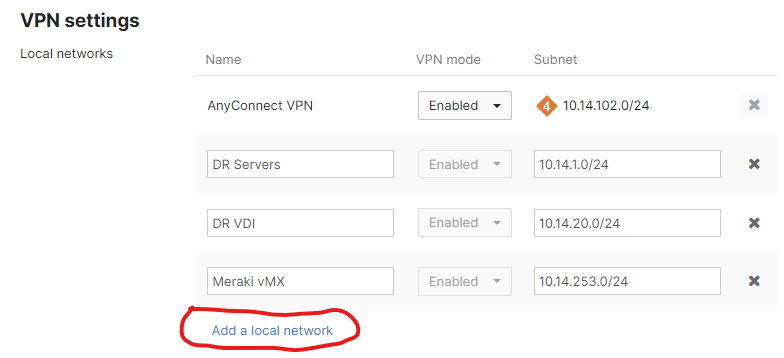
However, in NAT mode, the option to Add a local network is not there. The vMX (or MX) will advertise whatever networks are configured on the Addressing and VLANs page, either as VLANs or static routes.
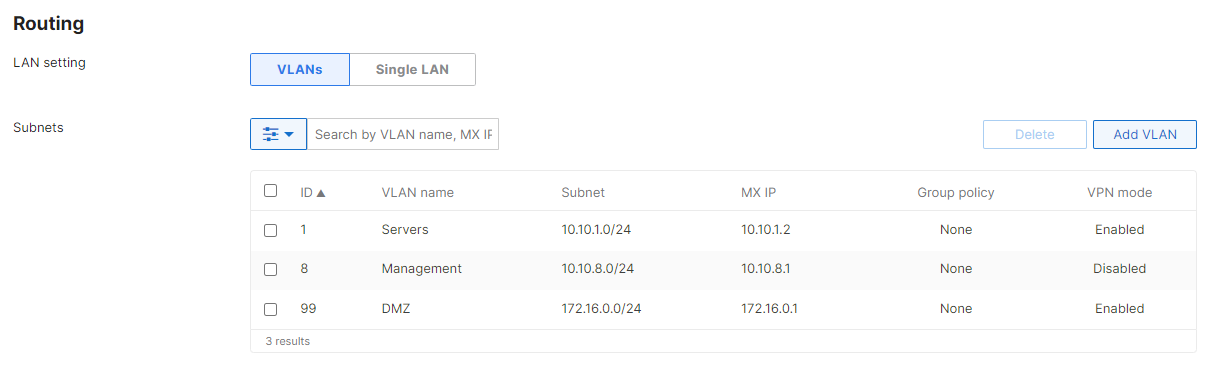
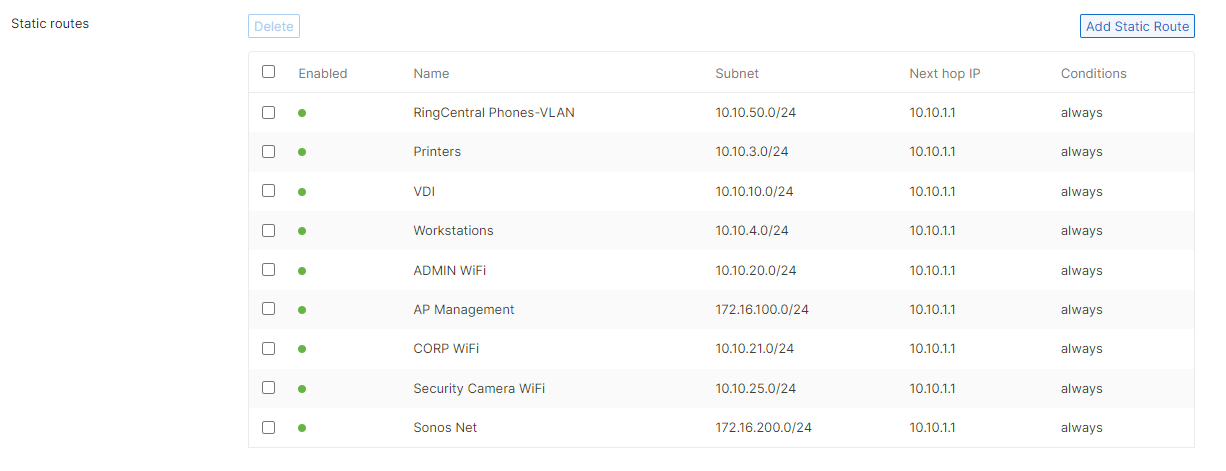
The Meraki guide for vMX NAT mode says that one must not configure VLANs on the device.

I tried this anyway, and let’s just say it won’t work. I’ll spare you the gory details.

That left only the option of adding static routes to the subnets sitting “behind” the vMX. These are the subnets in the vNet containing our servers and VDI hosts. Since the default LAN configured in Addressing and VLANs is fictitious, the vMX complained that the next hop IP of the routes is not on the any of the vMX’s networks. When I modified the LAN addressing to reflect the actual addressing of the vMX’s subnet in the vNet, I was able to add the routes, but traffic to and from these subnets went into a black hole. I guess the note in the article with the red exclamation point is legitimate.

Next I contacted Meraki support. It came to light, via internal documentation I have no access to, that the only way for hosts from other Meraki dashboard networks to reach the subnets behind the vMX is to use full tunneling. In other words, the other (v)MX’s would need to use this vMX as an exit hub and tunnel all their traffic to it, including Internet-bound traffic and traffic destined for other Meraki networks. That is unfortunately not going to work for us.

So at the end of the day we left the vMX in our DR environment in VPN concentrator mode. In the event of an actual disaster, or a full test, the RADIUS server will be brought up in the DR environment. So the RA VPN will work.

This was a tremendous learning experience. But it was unfortunate how much time was wasted due to lack of documentation of these limitations.
Impress Your Friends with Wireshark and TCP Dump!

For IT generalists like me, who work in a wide breadth of disciplines and tackle different types of challenges day to day, Wireshark is kind of like the “Most Interesting Man in the World” from the Dos Equis beer commercials.  Remember how he doesn’t usually drink beer, but when he does it’s Dos Equis?  Well I don’t usually need to resort to network packet captures to solve problems, but when I do I always use Wireshark!  Dos Equis is finally dumping that ad campaign by the way.

The ability to capture raw network traffic and perform analysis on the data captured is an absolutely vital skill for any experienced IT engineer.  Sometimes log files, observation and research aren’t sufficient.  There is always blind guessing and intuition, but at some point a deep dive is needed.

This tale started amidst a migration of all our VMs – around 130 – from one vSphere cluster to another.  We have some colo space at a data center and we’ve been moving our infrastructure from our colo cabinets to a “managed” environment in the same data center.  In this new environment the data center staff are responsible for the hardware and the hypervisor.  In other words it’s an Infrastructure as a Service offering.  Over the course of a couple months we worked with the data center staff to move all the VMs using a combination of Veeam and Zerto replication software.  One day early in the migration, our Help Desk started receiving reports from remote employees that they could not VPN in.  What we found was that for periods of time anyone trying to establish a new VPN connection could not.  It would just time out.  However if the person kept trying and trying (and trying and trying) it would eventually work.  Whenever I get reports of a widespread infrastructure problem I always first suspect any changes we’ve recently made.  Certainly the big one at the time was the VM migrations, though it wasn’t immediately obvious to me at first how one might be related to the other.

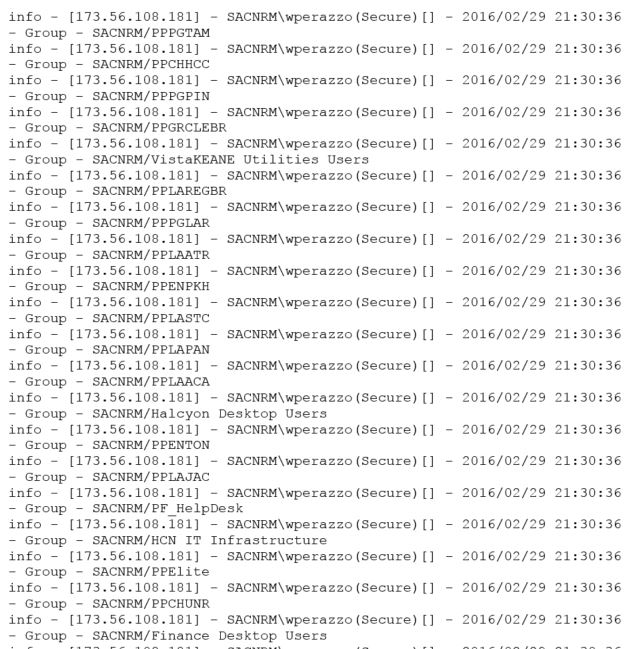
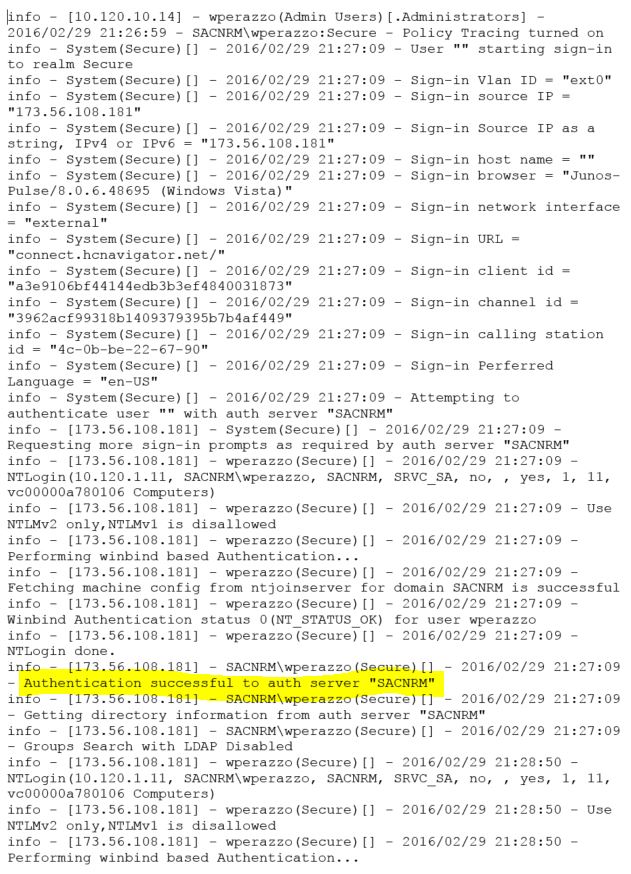
Our remote access VPN utilizes an old Juniper SA4500 appliance in the colo space.  Employees use either the Junos Pulse desktop application or a web-based option to connect.  I turned on session logging on the appliance and reproduced the issue myself.  Here are excerpts from the resulting log.

VPN Log 1

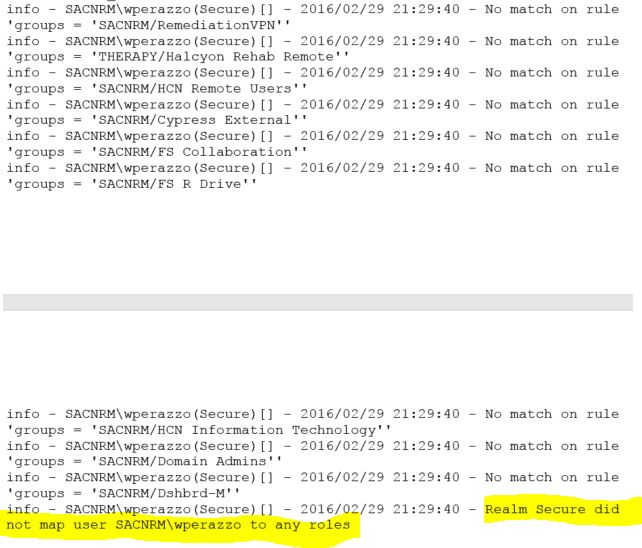
VPN Log 2

The first highlighted line shows that I was authenticated successfully to a domain controller.  The second highlighted line reveals the problem.  My user account did not map to any roles.  Roles are determined by Active Directory group membership.  There are a couple points in the log where the timestamp jumps a minute or more.  Both occurrences  were immediately proceeded by the line “Groups Search with LDAP Disabled”.

A later log, when the problem was not manifesting itself, yielded this output.

VPN Log 3

There are many lines enumerating my user account group membership.  After this, it maps me to my proper roles and completes the login.  So it appears that the VPN appliance is intermittently unable to enumerate AD group membership.

We had migrated two domain controllers recently to the managed environment.  I made sure the VPN appliance had good network access to them.  We extended our layer 2 network across to the managed environment, so the traffic would not traverse a firewall or even a router.  No IPs changed.  I could not find any issue with the migrated DCs.  Unfortunately the VPN logs did not provide enough detail to determine the root cause of the problem.

As I poked around, I noticed that the VPN appliance had a TCPDump function.  TCPDump is a popular open source packet analyzer with a BSD license.  It utilizes libpcap libraries for network packet capture.  I experimented with the TCPDump function by turning it on and reproducing the problem.  The VPN appliance will then produce a file when the capture is stopped.  This is when I enlisted Wireshark – to open and interrogate the TCPDump output file.  The TCPDump file, as expected, contained all the network traffic to and from the VPN appliance.  It should be noted that I could have achieved a similar result by mirroring the switch port connected to the internal port of the VPN appliance and sending the traffic to a machine running Wirehark.  Having the capture functionality integrated right into the VPN appliance GUI was just more convenient.  Thanks Juniper!

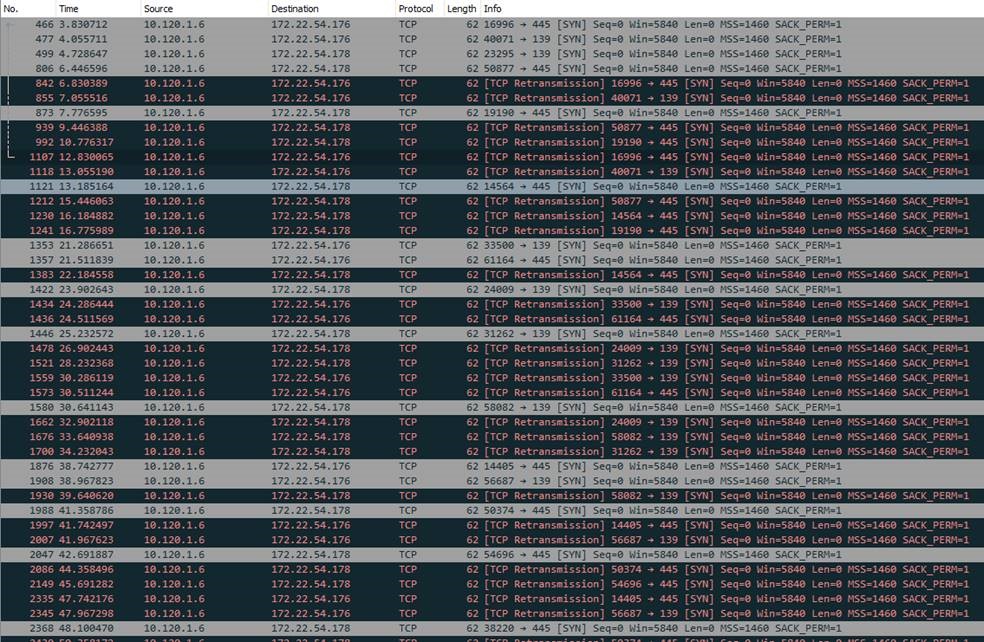
I was able to basically follow along the sequence I observed in the VPN client connection log, but at a network packet level.  Hopefully this level of detail would reveal something I couldn’t see in the other log.  As I scrolled along, lo and behold I saw the output in the excerpt below.

SA4500 TCPDump Excerpt

The VPN appliance is sending and re-transmitting unanswered SYN packets to two IPs on the 172.22.54.x segment.  “What is this segment?”  I thought to myself.  Then it hit me.  This is the new management network segment.  Every VM we migrate over gets a new virtual NIC added on this management segment.  I checked the two migrated domain controllers, and their management NICs indeed were configured with these two IPs.  And there is no way the VPN appliance would be able to reach these IPs, as there is no route from our production network to the management network.  The new question was WHY was it reaching out to these IPs?  How did it know about them?  And that’s when I finally checked DNS.

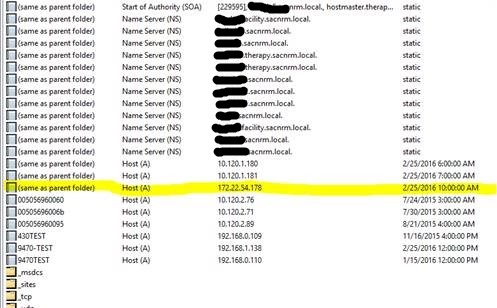
Bad Facility LDAP Entry (Redacted)

This is the zone corresponding to one of the migrated DCs.  I’ve redacted server names.  As you can see the highlighted entry is the domain controller’s management IP.  The server registered it in DNS as a glue record.  Any host doing a query for the domain name itself, in this case therapy.sacnrm.local, has a one in three chance of resolving to that unreachable management IP.  Then I found this.

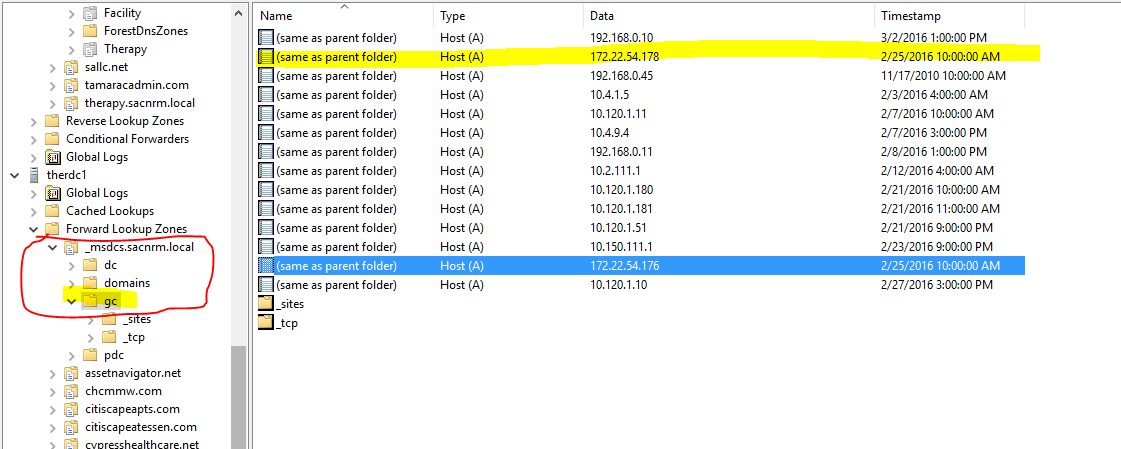
Bad GC Entry.png

The servers were also registering the management IPs as global catalogs for the forest.  This was what was tripping up the VPN appliance.  It was performing a DNS lookup for global catalogs to interrogate for group membership.  The DNS server would round-robin through the list and at times return the management IPs.  The VPN appliance would then cache the bad result for a time and no one could connect because their group membership could not be enumerated and their roles could not be determined.  This is a good point in the series of events to share a dark secret.  When I’m working hard troubleshooting an issue for hours or days, there is a small part of me that worries that it’s really something very simple.  And due to tunnel vision or me being obtuse, I’m simply missing the obvious.  I would feel pretty embarrassed if I worked on an issue for two days and it turned out to be something simple.  It has happened before and this is where a second or third set of eyes helps.  At any rate, this was the point when I realized that the issue was actually somewhat complicated and not obvious.  What a relief!

For my next move I tried deleting the offending DNS records, but they would magically reappear before long.  Having now played DNS whack-a-mole, I do not think it would do well at the county fair.  I’d rather shoot the water guns at the targets or lob ping pong balls into glasses to win goldfish.  My research led me to learn that the NetLogon service on domain controllers registers these entries and will replace them if they disappear.  Here’s a Microsoft KB article on the issue.  There is a registry change that prevents this behavior.  We had to manually make this change on our DCs to permanently resolve the issue.

So this was a couple days of my life earlier this year.  I was thrilled to figure this out and restore consistent remote access.  Of course in hindsight I wish I had checked DNS earlier.  And I was a bit disappointed that our managed infrastructure team was not familiar with this behavior.  But it was a great learning experience and Wireshark surely saved my bacon.  Time for a much deserved Dos Equis!  Stay thirsty my friends.

bad apples

So in my free time (HA!) I do some IT consulting work for a few small businesses.  Last month I ran into an interesting problem one of my clients was experiencing.  Felice emailed to report they could not send email from a particular account they have.  This account is set up to receive certain infrequent inquires from the company’s web site.  They then check the inbox via Outlook, yes infrequently, and may choose to bestow a courteous reply upon the sender.  I was somewhat surprised to hear that she had called Microsoft about this problem sending email and was supposedly told the computer had a virus.  This makes a modicum of sense when you consider Microsoft does offer free consumer support for…. wait for it….. virus problems.  At any rate they did not actually help in any way whatsoever.

applesI replied with the standard line of interrogation.  Do you have the password for the account?  Do you have access to webmail?  Are the messages sitting in the outbox?  Did you try a reboot?

Felice: no, no, yes, yes of course.

So no way to check easily via another method and no password…… hmm this may complicate things.  I could have tried to obtain an error message, but I happened to be busy working my day job at the time and decided responsibly to table this for the evening.

I took a drive over the Tappan Zee Bridge depicted so beautifully at the top of this page, which incidentally is not AS beautiful during the day when you can see all the rust and wear and tear and doubly not AS beautiful when you’re sitting in traffic.  It IS being replaced.  And luckily I do have my entertaining podcasts to get me through commuting nightmares (yay This American Life!)…. but I digress.

I reached my destination before dusk and got right to business.  Well not RIGHT to business; I always chat with my clients.  I’m not particularly outgoing or skilled in small talk, but I’ve developed just enough rudimentary social graces to “get by”.  So after catching up with Felice I got RIGHT to business.  I checked the send/receive error in Outlook and the error indicated that the outgoing mail server was refusing the connection.  I saw the hostname of the server and it had the word “Barracuda” in it.  My familiarity with the Barracuda SPAM firewall is evidenced by my earlier post on the love/hate relationship of our Barracuda and mail server as well as my collection of black EAT SPAM t-shirts.  I wish all our hardware vendors packaged clothing with their products.  I’d never have to go to the mall again!

Now, I neglected to mention one crucial detail.  While chatting with Felice, she revealed that they’ve had this issue for a week or so before calling me (wow).  More significantly, the emergence of the problem immediately followed a long power outage.  Now this is a small business with a Verizon FiOS internet connection and a dynamic IP address.  So when I hear power outage I immediately think “new IP address”.  So now getting back to the Barracuda, I found the web page to check Barracuda’s SPAM blacklist.  I entered their current IP address and sure enough POSITIVE HIT.  So that seals it.  Another FiOS customer, who had this IP in the past, somehow got themselves on a SPAM blacklist.  Now poor Felice ended up with it by chance and inherited its ugly reputation.

Thinking back a bit, I do have to give Microsoft some credit.  They may have indeed asked Felice for the error and surmised that HER computer was infected, zombified and spewing out SPAM.  This would be a logical line of deduction.  But A) why didn’t they help her remove the infection?, B) they were wrong anyway and C) i’m giving Microsoft too much credit.  Oh and D) suck it Microsoft, computers under my care do not become SPAM zombies.

So I could either try to get their email / web host to whitelist their IP in the Barracuda or get them a new IP.  Seeing as their email host is a mom and pop shop with no after-hours support, I opted for the latter option.  I rebooted the FiOS router, checked WhatIsMyIP.com, and same damn IP.  I got Verizon FiOS support on the horn and the technician had me turn the router off and on several times while he “tried something”.  No dice.  After succumbing to the reality that he lacked the power to do something so simple as get us a new IP address, we settled on the cop out of leaving the router turned off overnight.  Surely after 12 hours it would receive a different address.  And it did.  Problem solved.

The sad part about all of this IS……. what if Felice and her small business didn’t have an IT genius like myself?  She wasn’t even clear on who their email provider was and could not find a bill.  Microsoft blamed her.  And there’s no way Verizon would have helped if she simply explained she couldn’t send email.  They would have tested her internet connection and told her to talk to her email provider, after trying to sell her on some unnecessary “business services” including “advanced email hosting” or some such useless crap.  This type of thing should not just happen to people.  They’re just trying to run a business like good Americans, and they innocently inherit a tainted IP address from some porn addict who can’t stop from clicking everything bouncing around the screen.  Anyway I feel sorry for the next customer to get that IP.  Maybe I should track them down and send them a business card……..