dotted lines

In my current role, in addition to my manager, I have three clear dotted line reporting relationships. If you’re not familiar with the term, picture an organizational chart. Reporting relationships are depicted with lines, connecting employees to their manager. A dotted line relationship is an informal reporting relationship. Using my current role as an example, I report to the CFO and have dotted lines to the CEO, company owner and a VP. All of these folks play some part in reviewing and/or approving work my department does.

This is a little different from a matrix org structure in which there are two or more formal reporting relationships. For instance, a software developer reporting to both a project manager leading the software project they’re on as well as a functional manager.

Dotted line relationships are very common, especially in middle management roles. I’ve personally had these reporting relationships throughout my career. They are not without their challenges. This post is my attempt to articulate some of my learnings.

One potential challenge is conflicting expectations. You have to be careful with this one. Your first impulse might be to simply side with the person highest on the org chart. Always remember you have a duty to your formal manager. Keep them in the loop always. When there’s a conflict, go to them with it. As long as you are maintaining a good relationship with your manager, they will help. And they may just give you their blessing to do what the CEO, or whoever that higher status person is, says. They will appreciate you coming to them.

Also, and this is very important, be careful not to throw one dotted line under the bus when talking with another. It is easy to do this unintentionally – “ok, but Melissa said X”. As a human, you have a pre-frontal cortex providing you executive function. Use it!

Another challenge is inefficient or siloed communication. This one has a tie-in with conflicting expectations in that, if you’re typically meeting with each of your DLs one-on-one, you will likely end up in the middle of conflicts. Whereas if they’re all in the same room, they will naturally work out the conflicts with each other then and there. Try not to have separate status meetings with each of them. Do your best to corral them. Do not be afraid to point out the benefits of collaboration and alignment facilitated by meeting as a group.

In reality it may be difficult to achieve this. Some leaders prefer to have you one-on-one. It can also simply be a logistical hurdle to harmonize schedules of busy people. One tip I will give is, again, respect your formal reporting relationship. Include your manager on communications and invite them to meetings of strategic or financial significance, even if they may not be the primary audience. They must at least be given the option to stay informed.

Another communication tip – if you cannot get the whole band together for status meetings, mind the timing and order in which you meet with your DLs. For instance, you may want to schedule the regular status meeting with your formal manager earlier the same day you meet with the CEO. That way, they will both be working with the same current information. I learned this the hard way. After meeting with the owner of the company, I’ve had him go to the CEO and ask him about something we discussed. The CEO was not up to date on the topic and was caught off guard. Needless to say I learned my lesson. Keep all your DLs up to date. But make sure you do it in a way that no one will be blindsided by another.

And how do you know which DLs to go to for approval or consultation on any one specific matter? It is not always clear. And your formal manager may not always even know. This is something you’ll have to learn over time. It is part of the organizational tribal knowledge. While you are learning, err on the side of involving more DLs.

If this all sounds tricky, it can be. But in the scheme of things, it really doesn’t require a PhD. It’s a learnable skill. Just be thankful you have so many people taking interest in your work 🙂

Here’s a short anecdote illustrating the other side of the coin. I once worked for a SaaS company that was acquired. My manager’s role was eliminated. When my new boss from the acquiring company wouldn’t answer or return my calls, it wasn’t a good feeling (or a good omen). You WANT to be valued!

I’d love to hear about others’ experience with dotted line relationships. There are lots of situations I didn’t get into, like dotted lines to people outside the organization, reporting to a board of directors, etc. What are some of your tips for connecting your dotted lines?

There’s a Catch….

Migrating File Storage to the Cloud with SharePoint & OneDrive

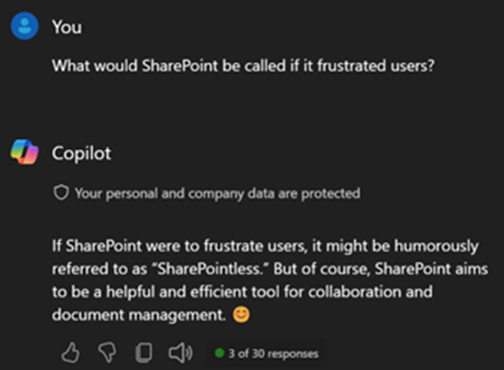
I was going to go with a SharePoint pun for this blog post title.  Check out this exchange with Windows Copilot.

Okay forget the pun.  I did almost use DespairPoint, but that felt too dramatic.  Though a few of my coworkers may have found it appropriate.  This blog post will cover a few gotchas that are not widely discussed, not with SharePoint per se, but rather with OneDrive when used with SharePoint.

Why go to the cloud?

My company works on various projects with outside parties.  Before moving our files to the cloud, we would collaborate with these outside parties either by emailing files back and forth or copying files to DropBox.  These were limited, cumbersome solutions.  OneDrive and SharePoint offered us:

  • Ability to easily share files ad-hoc with coworkers and partners.
  • Modern collaboration features (autosave, concurrent editing, etc.)
  • Better understanding of how our costs are distributed between projects & departments.
  • Ease of access through OneDrive app on any device with no VPN required.
  • Integration with our Microsoft Entra authentication with MFA and other security features.

It used to be a challenge to stand up and maintain the infrastructure required for SharePoint.  And it was an added expense.  With SharePoint Online, Microsoft is doing all the infrastructure heavy lifting, making it easy to get started.  And it’s included with most Microsoft 365 plans.  So you’ve got it whether you choose to leverage it or not.

What were the hiccups?

The cloud sounds amazing, right?  It is.  But it’s not perfect.  Software is not perfect.  Sorry, it’s just not.  Here is what you should know BEFORE migrating your files from your old Windows file servers to SharePoint & OneDrive.  Spoiler Alert: there is 3rd party software that resolves all these issues at the end of this article.

Issue #1: Consider path lengths

Even though Windows now supports long file paths (>256 characters), some apps do not – including some Microsoft apps – including, yes, OneDrive.  We migrated all our employees’ home folders to OneDrive, and it was not an issue.  No one had paths of this length in their home folders.  Next we migrated our project folders to SharePoint.  We let everyone know how to sync their document libraries to OneDrive for convenience.  Our employees are used to using Windows Explorer to manage and access their files and are not crazy about the idea of using the website.  Synching their document libraries brings their project files back into Windows Explorer.

Well, it turns out we have many (is “buttloads” too crass?) files in our project folders with paths exceeding 256 characters.  So what do you suppose happens when a file path exceeds the character limit?  One would be forgiven for assuming that the file would not open and produce an error.  But no, it’s actually much worse than that.  The whole document library will stop synching once it encounters a single file exceeding the path limit.  Yes, this is seriously what happens.

Why oh why does OneDrive not support long file paths by now???

How to deal with this issue

A workaround is simply not synching your SharePoint doc libraries to OneDrive (just use the web).  The hurdle here is user acceptance.  When you have a company used to working with files through the Windows File Explorer, it can be a big ask to adjust to the web interface.  Though in the past I’ve worked for organizations that didn’t seem to mind, so your mileage may vary.

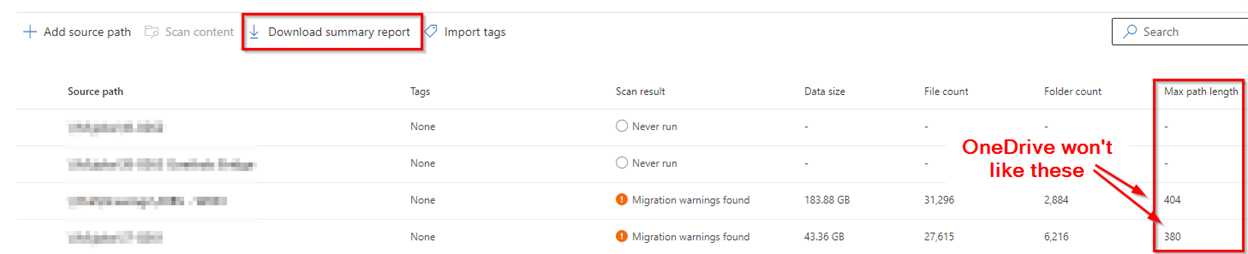
The way we dealt with this for the most part is through painstaking cleanup of long file and folder names.  I would highly recommend you utilize the Migration Manager in the SharePoint admin center to migrate your file shares to SharePoint and OneDrive.  After scanning your source paths, you will get their path lengths.  And reports with all the individual long paths can be easily downloaded.  Check this before migrating!

Click to enlarge

Issue #2: No file locking

One of my bullets above about advantages of the cloud included concurrent editing of files.  Microsoft copied Google and others on this one.  No longer will we get those unwelcome messages that our file is opening read-only because it’s in use by so-and-so.  And that button to notify the person who has the file open NEVER worked.  Now we can both edit the file simultaneously and can see what each other is doing.  This is a great feature for remote teams.  I remember taking advantage of this in Google Docs in grad school on group papers.

Well, not all files are Microsoft Office files.  As it turns out, not all files behave well when opened this way – CAD files being a prominent example in our industry.  There is a way to turn off simultaneous editing.  SharePoint has for many years had a check-in/out feature that in effect disables it.  But there’s a catch. It doesn’t work in OneDrive.  Doc check-in/check-out is not integrated in OneDrive.  So when this feature is turned on, one cannot check out a file and the file will open read-only through OneDrive.  To restate, if you are synching your SharePoint doc libraries to OneDrive, you cannot take advantage of check-in/out.  So get ready for a lot of weird behavior when multiple employees open a non-Microsoft format file read/write.

How to deal with this issue

This one can also be worked around by not using OneDrive.  But in addition you also must utilize the check-in/check-out feature on any doc libraries where you have CAD files or other files that do not play nice with concurrent access.  Here again you’re dealing with user acceptance hurdles – not having the file explorer integration and having to check-in/check-out.

Issue #3: Spreadsheets linked to other files

You might imagine how this could be a problem, since all your file paths are going to change post-migration.  Your spreadsheet will not be able to pull data from the linked file(s).

How to deal with this issue

It’s actually not that bad of a situation if the linked files are within the same document library and their relative paths do not change during the migration.  There are some great articles out there to help you deal with this.  Here’s one.  It would be a good idea to survey your environment for spreadsheet linking prior to migrating files to SharePoint or any other cloud storage platform.

Third party solutions

There is a quasi-solution to all three problems in the form of third-party software tools.  My team and I did extensive research on the available products, and the only one we found that helped us with all three issues is Zee Drive.  I’m surprised how long it took us to find this product.  It took more than a few web searches and Reddit posts.  To resolve the issues we encountered, Zee Drive has the following capabilities:

  1. Map SharePoint doc libraries to drive letters, providing file explorer integration without needing OneDrive. – Addresses issue #1
  2. Option to lock files when they are opened. – Addresses issue #2
  3. If your drive letters match the letters folks had in the past, all file paths can be preserved through the SharePoint migration. – Addresses issue #3

Also in the pro column, Zee Drive can be centrally managed and utilizes your existing M365 authentication.  We have also received excellent support.

There is however some baggage with this solution:

  1. You’re back to drive letters.
  2. Appears to be a one-person (or close to one-person) shop.
  3. They only accept payment through PayPal.
  4. Requires software to be installed on each computer your employees will use.  Software installation can be automated, but requires a slightly more costly license to avoid every user having a unique license key.
  5. Costly for what you get.  As of the time of this writing, it will run you $5.45 / user / month if you’re willing to deal with a separate license key for each user.  To have a single shared license key, and the ability to automate installation, you must buy shared computer + shared user licenses for a total of $6.50 / user / month.  This is more costly than a Microsoft 365 Business Basic plan!  Apparently there are price breaks starting at 1,000 licenses.

Due to the cost, we are only deploying Zee Drive to folks who absolutely must have it.  There are alternatives out there that are a little less capable but may work for you.  Do your research!

In conclusion, like all complex software platforms out there, SharePoint & OneDrive have their gotchas.  These are not insurmountable, and the advantages of the platform are worth it for the vast majority of customers.  Hopefully the information offered here helps you prepare and have a smoother journey to the cloud!

Beware the Meraki vMX in Azure

The virtual Meraki MX (vMX) is no doubt a powerful and useful way to extend your Meraki SD-WAN into the public cloud. My company utilizes two of these virtual appliances in Azure, one in our production server network and one in our disaster recovery environment.

I cannot speak for the vMX in AWS, GCP or any other public cloud. But one major distinction between the vMX in Azure and a physical MX is that the vMX isn’t really a firewall. It’s meant to be used as a VPN concentrator, not the gateway to the Internet. It has a single interface for ingress and egress traffic. This aspect of the vMX, while crucial to understand, is not what this post is about.

Gotcha #1 – So you want your Remote Access VPN to actually work?

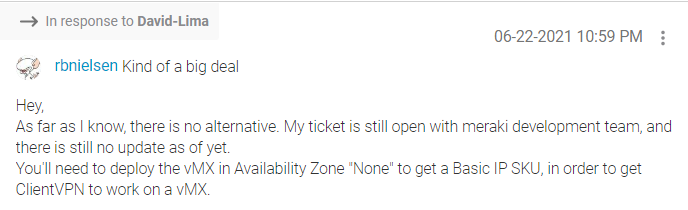
Our employees with laptops and other portable computers utilize VPN for remote access. When we migrated our servers to Azure it made sense to migrate the remote access VPN concentrator functionality from the physical MX in our main office to our vMX in Azure. We performed the setup on the vMX, but it would just not work. We came to find out that this functionality will only work if the vMX is deployed with a BASIC PUBLIC IP. The default public IP attached to the vMX is a standard. You cannot change this or attach a new interface once the vMX is deployed. In fact, you will not even see an option in the appliance setup wizard to deploy with a basic public IP. The answer to this conundrum cannot be found in Meraki’s published deployment guide for the vMX. It can be found deep in a Meraki forum post:

You read that right. To get the Basic IP (and a working RA VPN), you’ll need to keep the vMX from being deployed into an availability zone. Straightforward, huh?

Gotcha #2 – The location of your RADIUS server is important

This one also relates to the remote access VPN functionality. When we finally got the RA VPN working in our production environment, the RADIUS server was living in the same vNet as the vMX. And all was right with the world. Then we deployed a second vMX in our DR environment, in another Azure region and vNet. To test the RA VPN functionality, we attempted to utilize the production RADIUS server in the production vNet.

After submitting the user password, it would just time out. Packet captures from the vMX revealed the RADIUS requests from the vMX had source IPs from an unexpected public IP range. After much troubleshooting with Meraki support, it came to light that these public IPs are from the RADIUS testing functionality of Meraki wireless access points. This is some sort of a bug that manifests itself when the vMX is deployed in VPN concentrator mode. Meraki support suggested I could get this to work if I put the vMX in NAT mode. Supposedly new vMX’s are deployed in NAT mode by default anyway. So we put the vMX in NAT mode and sure enough, this resolved the issue. The RADIUS requests were now being sourced from the “inside” IP address of the vMX and reached the RADIUS server. And that’s when I noticed another gotcha……

Gotcha #3 – NAT Mode vMX Must be an Exit Hub

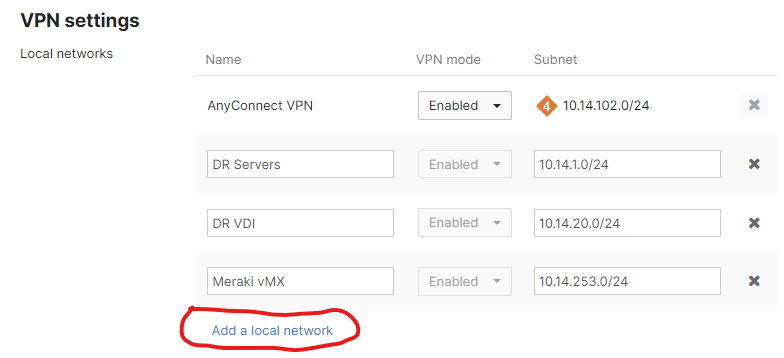
The vMX in NAT mode is some sort of paradox. The thing has one interface! Here’s the problem. When the vMX (or an MX) is in VPN concentrator mode, one can simply add networks to advertise across the autoVPN on the Site-to-Site VPN page.

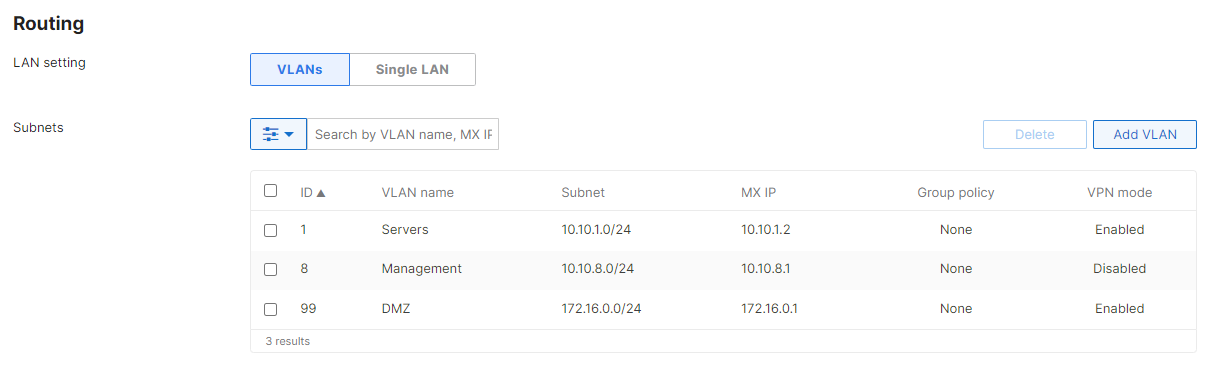
However, in NAT mode, the option to Add a local network is not there. The vMX (or MX) will advertise whatever networks are configured on the Addressing and VLANs page, either as VLANs or static routes.

The Meraki guide for vMX NAT mode says that one must not configure VLANs on the device.

I tried this anyway, and let’s just say it won’t work. I’ll spare you the gory details.

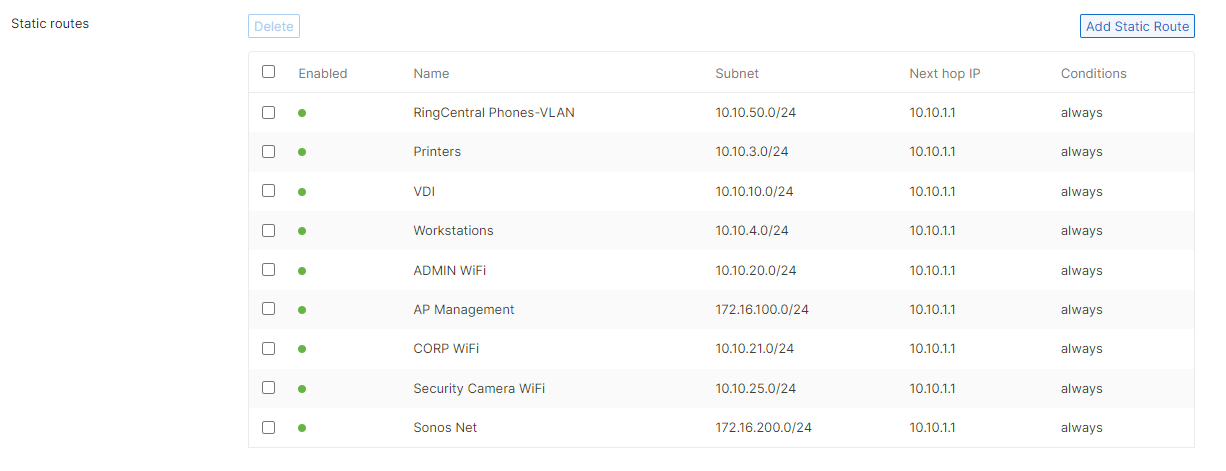
That left only the option of adding static routes to the subnets sitting “behind” the vMX. These are the subnets in the vNet containing our servers and VDI hosts. Since the default LAN configured in Addressing and VLANs is fictitious, the vMX complained that the next hop IP of the routes is not on the any of the vMX’s networks. When I modified the LAN addressing to reflect the actual addressing of the vMX’s subnet in the vNet, I was able to add the routes, but traffic to and from these subnets went into a black hole. I guess the note in the article with the red exclamation point is legitimate.

Next I contacted Meraki support. It came to light, via internal documentation I have no access to, that the only way for hosts from other Meraki dashboard networks to reach the subnets behind the vMX is to use full tunneling. In other words, the other (v)MX’s would need to use this vMX as an exit hub and tunnel all their traffic to it, including Internet-bound traffic and traffic destined for other Meraki networks. That is unfortunately not going to work for us.

So at the end of the day we left the vMX in our DR environment in VPN concentrator mode. In the event of an actual disaster, or a full test, the RADIUS server will be brought up in the DR environment. So the RA VPN will work.

This was a tremendous learning experience. But it was unfortunate how much time was wasted due to lack of documentation of these limitations.

The Conundrum of Responsibility without Authority

There are a plethora of blog posts and articles across the Internet dealing with the age-old conflict of responsibility without authority.  This short LinkedIn post even cites a fun term “NAG Syndrome”, so named because the responsible person without authority inevitably resorts to nagging to try and get things done.  In this post I offer a theory for the root cause of this situation for PMs, absolve (some) companies of blame and offer some ideas to lessen the pain for all.

The dysfunctional project lifecycle

In my project management roles this was a daily struggle and probably my biggest stressor.  The typical scenario is:

  • PM works with team to come up with realistic estimates for work and a project plan.
  • Plan and time estimates are provided to client along with other client expectations.
  • Work begins.
  • Work starts to run late.
  • PM speaks w/ engineers who report various reasons for lateness.  The reasons range from conflicting work from other projects to being redirected to production support issues to unforeseen obstacles.
  • PM works to overcome obstacles and adjusts schedule.
  • Work continues to run late due to similar issues.
  • PM speaks with functional engineering manager.  Engineering manager is sympathetic and tries to be helpful.  Some understanding is reached to try and keep things on track.
  • PM adjust schedule.
  • Work continues to run late due to similar issues.
  • PM wrestles with whether to go over head of engineering functional manager.
  • PM escalates up the chain.  Changes are made to either resources, processes or both.  Account management gets involved and tries to smooth things over with client.
  • Work continues to run late due to same issues.

What I omitted was that in between all these bullets, the client and upper management are having a lot of difficult conversations with the PM and giving them negative feedback.  The PM is ultimately held accountable for the project delivery.  The PM eventually has to nag and constantly monitor the engineers on the project to try and ensure they’re fulfilling their commitments.

It’s the org structure stupid!

I think this type of situation is probably more prevalent in smaller organizations.  I say that because the root cause of this is an organizational structure typical to smaller companies, specifically when project resources do not report to the PM.  Time for a quick review of org structures.

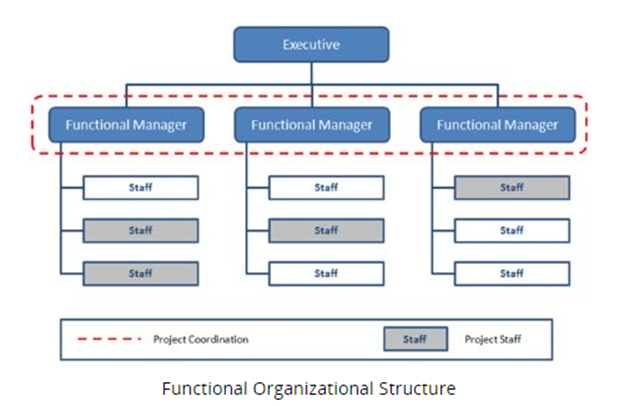
In the traditional functional structure, the organization is split up into departments based on business function.  The staff report to functional managers, who in turn report to middle / upper management.

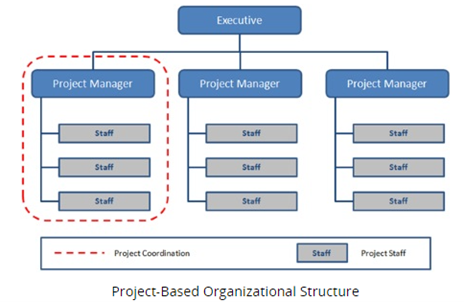
The other end of the spectrum is project-based or, as PMI calls it, projectized.  This is the ideal structure for an organization whose business revolves around executing projects, i.e. a service provider.  Instead of being aligned around functional departments, the staff are assigned to projects managed by a project manager.  The PM has control of resources including staff and budget.

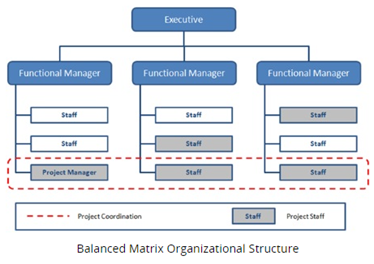
In between is the matrix structure, of which there are several levels.  The term matrix implies dual reporting relationships.  Staff have a functional manager and there are project managers.  The balance of authority between the two determines the flavor of matrix.

Here’s what a balanced matrix looks like as an org chart.

The problem occurs when a project-driven organization uses a matrix structure, particularly a weak or balanced matrix, rather than a projectized structure.  The PM will not have authority proportionate to their responsibility for onboarding revenue.

Why, oh why, does this happen?

So why does this happen particularly with smaller companies?  I believe there’s a good reason for it and it’s not due to any fault of their own.

If you look at the project-based structure, you see each staff member is assigned to one project with one project manager.  This is ideal (and indeed important in agile scrum).  However smaller service providers tend to work on many smallish projects.  Indeed, the IT projects I led were typically tens to hundreds of hours of work.  And I was managing around 15 – 20 at a time.  When you have < 10 engineers and you’re spreading them among 50+ small projects, do the math.  You can’t have dedicated project teams.  You end up with PMs and engineers spread across many projects.  And projects turn over on a week-to-week basis.  If you had the engineers reporting to PMs in this type of business, each one would end up reporting to all the PMs simultaneously.  That’s a bit hard to manage for a small business and it’s not scalable.

In a larger company with a greater number of resources working on large multi-year projects with huge budgets, you can dedicate a team to a single project full time.  Then you’re in a position to align to a projectized structure.

So it’s really not the company’s fault?

If you’re a PM working for a large company managing large projects and you don’t have authority over staff and budget, I believe there is misalignment in the organization.  If, however we are talking about a company of say 200 or fewer employees, then no I don’t think it is their fault.  Don’t get me wrong, there is plenty of chaos and dysfunction rampant in small companies, especially young small companies.  It’s part of the game.  But as far as the issue at hand, it’s a chicken and egg scenario.  You can’t evolve into a project-based org alignment until you can have dedicated project teams, or at least something close.  And you can’t have dedicated project teams unless you are working on sufficiently large projects and you have enough staff.  So the book of business has to grow and you need to chase bigger fish.  That is easier said than done and may not even be a long-term business objective for the company.

Then what is to be done?

As a manager, both PM and functional, I always like team members who not only point out problems but offer ideas.  I will admit that even when I was in a PMO management role at a small service provider I could not crack this particular nut.  But I did nibble around the edges.  Here are some ideas based on my experiences.

1. Provide PMs with avenues for healthy communication.

I worked for one organization where we had a weekly portfolio review meeting w/ representatives from account mgmt., accounting, the engineering functional manager, project engineers and the COO along with PMs.  It was an “expensive meeting”, but it allowed the PMO to broadcast the health of all our projects to all key internal stakeholders at once.  We focused our time on issues and roadblocks.  It created some real efficiencies in getting much needed help and forced the occasional uncomfortable but necessary conversation out into the open.

2. Leverage an information system for collaborative resource scheduling.

In a matrix organization resource scheduling for projects should be a collaborative exercise between the PMs and functional managers.  Ensure that all resource allocations are input into an information system for tracking and reporting.  Scheduling (and re-scheduling) should occur on a weekly basis, preferably a few weeks out.  Ensure the PMs and functional managers review actual variances together on a weekly basis.

3. Make functional managers share in responsibility for project delivery.

Once you’re keeping track of scheduled to actual work data, the functional manager should need to answer for the shortfalls in actual work done – not the project manager and not the project resource.  Although the project resource needs to answer to their functional manager.

4. “Stick” resources to a particular PM.

If you have an engineer who specializes in VoIP, pair them up with a particular PM on your VoIP projects.  The larger the proportion of that engineer’s work is for a single project manager, the easier you’re making it to juggle their scheduling.  The more you’re able to stick resources to a particular PM, the closer you’re getting to a projectized alignment.  Plus you will gain tangible efficiencies from the rapport they develop from working together so much.  There is some risk around cross-training, etc. when you do this.

5. Keep project resources out of production support.

I know this is hard to do if you’re a small business.  But until you have separate teams for these functions, you will be operating in a state of chaos.  Not organized chaos, which I will take in a small business, but unadulterated chaos.  Once you do have separate teams, put in some process and procedure to try and keep them separate.  If you can do this 80% right, give yourself a pat on the back.

And that is all I’ve got.  Good luck out there PMs!

How to scale your PMO in 99 simple steps

Okay don’t take the title literally. There are much fewer than 99 steps, though it is not simple.

I’ve worked for several small IT managed service providers. Like every company that survives its first few years, there comes a point in time when the organization must mature in order to scale and grow. I’ve taken part in a couple of such efforts, and I can’t help but feel we always nibbled around the edges on the PMO side. Most people with a pulse tend to intuitively know what the areas of improvement are. This is evidenced by all the complaining we hear at work about dysfunctional processes, teams, etc. But there are different approaches to actually driving and managing change.

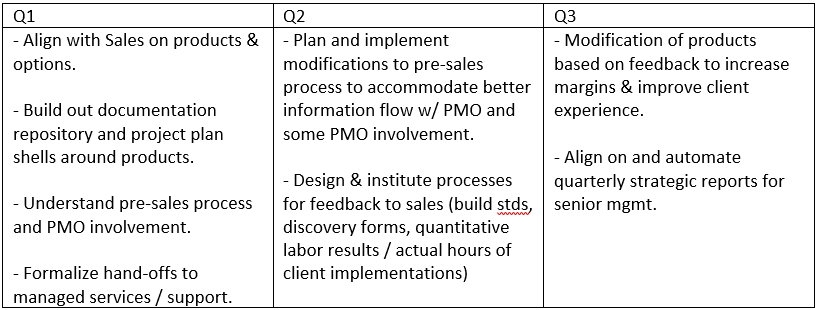
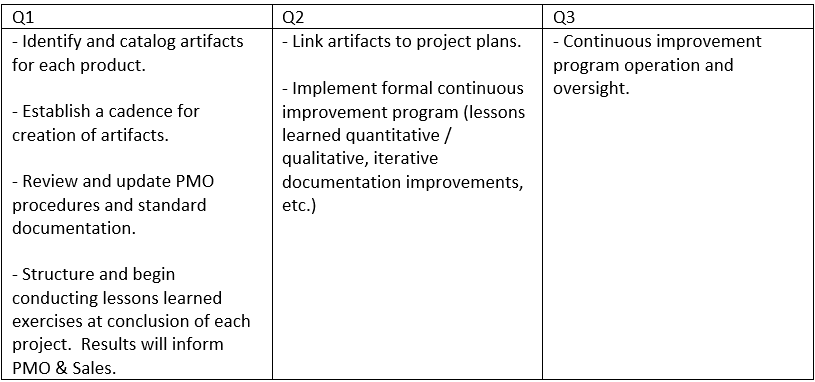
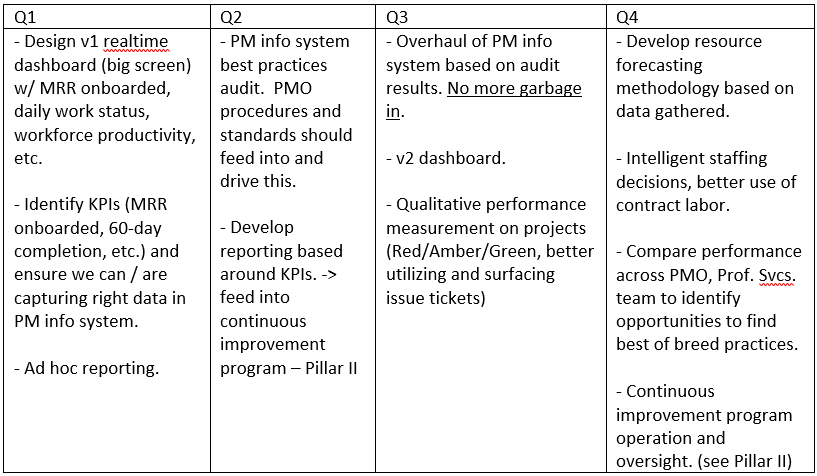
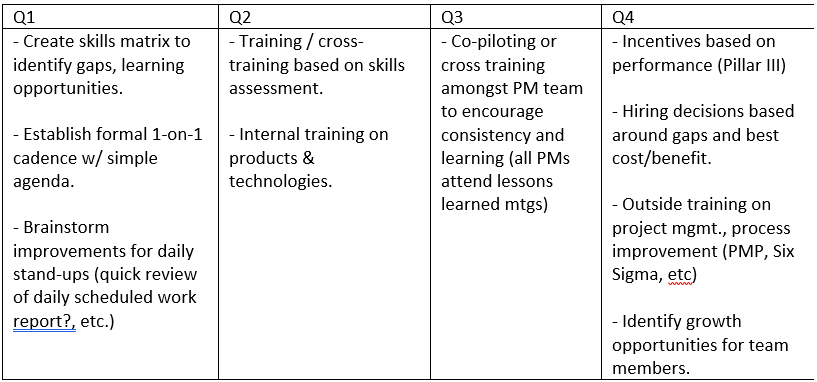
I recently went through a thought exercise, mostly on the elliptical and in the shower, of how I might approach improving an immature PMO holistically and strategically. Below is a lightly edited braindump of this exercise. I specifically had an IT managed service provider in mind. But much of it is broadly applicable with minor tweaks.

Hopefully someone out there finds this useful as a starting point or for idea generation.

PMO Improvement Program

  • Establish RACI for each initiative, 1 person accountable.  Part of performance review.
  • Establish governance for program.

Pillar I – Organizational Alignment

Pillar II – Standards, Process & Procedure

Pillar III – Performance Measurement

Pillar IV – Staff Development

Falling on one’s sword for others

In this first installment of the Dark Side of Project Management, I’ll tackle a thorny practice that can really breed resentment.  My research, and by that I mean five minutes of Googling, indicates that the expression “falling on one’s sword” dates back to the Roman Empire.  Military leaders would literally fall on their sword and commit suicide after an embarrassing defeat.  This was a way of taking responsibility and owning up to their failure.  The phrase is sometimes used in business today and it basically means to apologize, resign over or otherwise take responsibility for an error with a gesture.  The phrase is usually reserved for big screw-ups in my experience.

There’s nothing wrong with owning up to one’s mistakes.  In fact, a PM should always own up to their mistakes.  But this post isn’t about that.  It’s about owning up to others’ mistakes or failures, or put another way accepting blame for others.  This phenomena is in no way unique to PMs.  There are many motivations employees may have for covering for their coworkers.  In the PM world, you’ll see this practice more often when engaging in client-facing projects.  Why?  A PM may be tempted to protect other team members as well as the image of their company.

Project managers, have you experienced any of these situations on a client-facing project?

  • A critical project team member is suddenly pulled off time-sensitive work for a support or operational issue and as a result is unable to complete project work by the agreed upon deadline.
  • An experienced project team member makes a very rookie mistake, adversely affecting the project.  And by the way, this usually will happen when the team member is forced to do too much multitasking and is unable to focus.
  • The client asks for some basic common piece of product or operational documentation and it doesn’t exist.
  • A senior leader in your organization has a side conversation with the client and promises something unrealistic related to your project.

If you have experienced any of these or other similar situations, you may have been tempted or felt you had to take one for the team.  What’s worse, a PM does not need to explicitly accept blame to be judged harshly by the client.  Whenever a project does not live up to expectations, in the absence of another explanation, the client will always naturally blame the PM.

If you find yourself looking bad repeatedly due to other team members or organizational shortcomings, it can be career limiting – especially if you intend to stay in the particular industry you are in.  You do not want your reputation to take a hit due to factors beyond your control.  Plus your job satisfaction can’t be very high if you find this happening to you.  So what should you do?

What you should not do is make up fictitious excuses.  This is flat out unethical.  Though I will say I’ve seen some very skillful wordsmiths come up with explanations that downplay a deficiency while not out and out lying.  For example one can make a resource crisis that would look embarrassing sound more like a temporary hiccup: “Unfortunately Joe resigned today (truth).  We’ll just need a couple weeks for another engineer to free up.” when you actually need to hire someone to replace Joe because he’s your only X.  Telling these half truths is also not a good game plan.  It may save your bacon here and there, but if you keep doing it you eventually start to smell like a rat.  And as I indicated earlier, at the end of the day the client will blame you anyway when the project doesn’t go well.  Finding oneself telling a lot of half truths and doing frequent damage control with clients is often the first sign of an endemic problem.

What you should do first is engage your influencing skills and tackle the problem head on.  If you cannot effectively influence the person or people who can rectify the problem, talk with your manager.  Make sure you have concrete facts that demonstrate how your reputation is unjustly taking a hit.  If your manager does not or cannot help, it may be time to update your resume.  I don’t care how much you may be earning, it’s not worth the career hit.  Don’t be shortsighted.  And don’t convince yourself that it’ll eventually get better unless there’s reason to.  That’s being a victim.

In short, don’t make a habit of falling on your sword for others.  You deserve better.  In closing, I want to leave you with something to chew on.  You know all those incompetent vendor PMs you’ve come across over the years?  Could it be that some of them were not in fact incompetent, but rather falling on their sword for others?  Maybe we should try to give them the benefit of the doubt, or at least a little more rope.

Good luck out there PMs!

The dark side of project management

There are myriad useful project management resources and articles on the web.  A PM can learn about agile methodologies, download templates for common project artifacts and read countless articles on best practices and real-world case studies.  So naturally, for my part, I’ve decided to go in a… well… a different direction.  I’ve decided to publish a series of (occasional) blog posts on another side of project management – the dark side (MUAHAHA!!).

I’ve been working on IT projects for about 15 years in various roles: technical SME, project engineer, project manager, program manager, service provider PM and others.  I’ve often served multiple roles on a single project.  And I’ve worked for a number of scrappy small and medium sized organizations that have at times been in tough situations.  This is relevant because one tends to find some of the following conditions at smaller companies:

  1. Overreaching / overcommitting in an attempt to grow a book of business.
  2. Less formalization of policy, process and procedure than larger organizations.
  3. Agility – changing strategy and priorities quickly and frequently.
  4. Inexperienced leaders (including yours truly) and staffing gaps.
  5. “Fake it ‘til you make it” survivalist culture.

And it is conditions like these that can make a project go sideways, upside down or inside out.  In this series I will draw on first-hand experience and my observations of others’ tough experiences.  I will also offer my opinions and advice along the way.  I will not be recounting actual events, merely using my professional experience to inform my coverage of some tough topics you didn’t learn about in your PMP classes.

I’ll be posting my first installment next week:  Falling on your sword for others.

Thoughts on agile IT infrastructure

Since losing my job in March I’ve been using some of my time for professional development. One of my pursuits is learning about agile project management with a focus on Scrum. As someone who has spent most of his career in IT infrastructure and operations, I have had limited exposure to agile. Agile is primarily geared towards software development projects, though it can be used for just about anything. I’ve been seeing and hearing the term more and more often, including in just about every project management job ad.

My recent research has consisted of:

  • The ITProTV Agile Scrum Master course
  • Two seminal books by Mike Cohn, one of the founders of the Scrum Alliance
    o Succeeding with Agile
    o Agile Estimating and Planning
  • Several blog posts and articles on the web related to agile IT infrastructure practices

At this point I’m sold on the advantages of agile. Cohn does a great job of backing up the advantages with studies. For my part I am interested in exploring how best to utilize agile practices in IT infrastructure projects and potentially operations. Following are some observations on the subject based on my research:

Agile is incompatible with fixed fee contracts
Okay this heading is a bit bold (har har), but there’s definitely a lot of truth to it. I worked for an IT managed service provider the past couple years. Most of our client engagements were in IT infrastructure hosting and management. And most of our implementation contracts with our clients were fixed fee. Fixed fee is common in projects with a well defined, well understood product or service being delivered.

One of the tenets of agile is to welcome change – to scope, budget, schedule. If the client realizes that an additional feature would be very useful or that they no longer need a certain aspect of the product, we should oblige them. Scrum in particular eschews detailed contracts that attempt to lock down scope. This is at odds with fixed fee contracts. With a fixed fee contract, the project manager is incentivized to prevent scope creep so as not to add work that will drive the project over budget and late. There is typically a formal scope change process which makes the impact clear to the client.

So I would conclude that agile projects should be T&M or similar. It’s fine to provide some estimate up front, but the client must go into the engagement with eyes open to the fact this is an agile project and they should have an understanding of what that means. It ultimately benefits them, but there are expectations of them as well. I recently interviewed with a company in the software development and customization world and I asked about this in the interview. They indeed bill T&M and agreed that their projects and agile practices would not work with fixed fee.

Thou shalt form squads
I am not a big fan of marketing terms or catchy terms people come up with for things. I’m still getting used to user stories and daily scrums. But in my agile research I did find one that I like – SQUADS! As best I can tell this is not a scrum term, but I have been hearing it in agile contexts. I take it to be synonymous with agile teams. A squad is a multidisciplinary team. In the software development world the team may consist of developers, database designers, UX designers, architects, testers, etc. In the infrastructure world a squad may include systems engineers, network engineers, DBAs, ops folks, etc. The idea here is to eliminate delay inducing hand-offs between functional teams and to build shared accountability and camaraderie. I actually applied for a job the other day with a title of Squad Manager. Pretty badass, huh? This comprehensive McKinsey article discusses how squads work in an infrastructure organization. In my experience smaller IT departments of say 20 or fewer are already in effect a squad. They tend to be collocated and in frequent contact. Though sometimes inserting different functional managers into a group of even this size can create barriers. The article suggests that in larger organizations infrastructure squads should be formed around applications or services. So maybe there’s a storage squad or a squad for a particular SaaS application. These squads can work in an operations mode or executing projects in their line of business.

Automate early
Automation has been a hot button topic in IT infrastructure for many years. From shell scripting to automation software packages to the cloud. Larger organizations have usually led the way due to the imperative to scale and the lack of scalability of manual processes. In agile software development, automated tests are critical. There is no test phase at the end of the project. Unit testing happens during each iteration as code is written. Integration testing may be run on a nightly basis against the code checked in end of day.

In the infrastructure world, automated testing or verification is nice to have – like comparing a farm of web servers against a configuration baseline perhaps. What’s even more critical in an agile world is automated operations. Like the use of squads, automation enables an infrastructure organization to become more responsive. Can we spin up a server or push out a configuration change to all our routers with the click of a button? Can we facilitate DevOps by providing self-service options to our developers?

In the project world, I think the usefulness of automation comes in either when working on large projects where a piece of infrastructure will need to be deployed many many times or in the case where you’re executing basically the same project over and over as does a service provider selling Office 365 for instance.

Projects vs. Operations
I think that agile practices can work both in the project world as well as daily operations. Certainly the particular practices I’ve covered in this article can be effective in both. One question I have is how this is all going to work cohesively in an IT organization? I don’t think adopting every agile practice is practical. IT folks need to use some common sense and adopt what makes sense in their particular environment.

For example, Cohn greatly prefers sticking to index cards for managing user stories, sprint tasks, parking lot charts, etc. But try to imagine a service desk that uses index cards for their service tickets. I think someone could make a pretty funny YouTube video on that premise, if they haven’t already. So do you use two systems, an analog one for project management and digital for service desk? Or do you try to find one that does it all? From the perspective of someone who has done reporting of service desk and projects side-by-side, I’d rather have everything in the same database. But maybe it’s better to just find the best system for each job. And while you can maybe put services into operation or perform continuous improvement in iterations, can you operate a service desk in iterations? Probably not. But you can certainly have a daily stand-up to prioritize tickets, review urgent tickets unresolved the prior day and make a game plan.

Your whole IT organization must be agile
If you have agile development teams in your organization, you must have agile infrastructure teams. At the very least you must have heavily automated processes for deploying infrastructure and you must be able to respond to requests from developers quickly. And you should probably have infrastructure representatives sitting in on development daily scrums or at least sprint planning meetings. This way you know what is coming your way and you even have some input.

The consequences of isolating agile to development are well covered by Cohn in “Succeeding with Agile”. At best, inability to complete user stories in some iterations. At worst, a backslide into old ways of developing software. In his book, Cohn provides strategies for getting HR, Facilities and the PMO on board as these are key groups needed to support agile development.

When not to be agile
Okay this is an intentionally incendiary heading. Of course we should always be as agile as possible given the constraints we are under. But in thinking about many of the infrastructure projects I’ve worked on, I would say that a lot of them were sequential by nature….. with many interlinking dependencies. And forget about having a “potentially releasable product” every two to four weeks. That just doesn’t make sense. For this type of a project, does it does it make sense to utilize an agile methodology? I don’t think there’s a hard and fast answer. I think one should employ as many agile practices as possible given the situation. If you are performing a virtual server migration where you are migrating servers in groups over the course of several months, there is an inherent iterative nature to the work and greater opportunity to be agile. In a more sequential project, one can still borrow practices like a daily stand-up meeting and keeping the team small and collocated if possible. One can display big visible charts and dedicate some time to building automated verification tests (if this type of work will be repeated).

One of the big reasons agile software development de-emphasizes up-front planning and estimates work with a unit-less measure (story points) is the acknowledgement that we cannot know the end product with any real clarity before we start building it. It is a waste of time and effort to do a detailed requirements analysis phase. And schedule estimates made before execution begins will inevitably be wildly inaccurate.

With infrastructure projects these things are typically less true. Sometimes we know the end state with a great deal of clarity. Although I can also think of countless instances where the project team and the customer had mismatched expectations. In that vein I try to use historical data to estimate whenever possible. I also employ what the Project Management Institute calls rolling wave planning, which basically means to plan out the first execution phase in detail and later phases in less detail – maybe a milestone plan only. Then break out details of the later phases just before execution starts. This doesn’t help at all with estimating schedule, but it does move planning to more appropriate times when we have as much information as possible to make decisions.

My point is that an infrastructure PM on a sequential project can utilize a waterfall methodology AND adopt certain agile practices as appropriate. I don’t know how an agile purist would feel about this, but I can certainly envision situations where this would be the best approach in my mind. I am very interested to learn how IT infrastructure and operations folks are utilizing agile practices, what successes they’ve had, what pitfalls they’ve run into and some of the adaptations they’ve come up with to suit their situations.

It’s OK to hire people smarter than you

Update (Aug 8, 2019):

I’ve been seeing a couple quotes make the rounds on LinkedIn that made me think about this post.  One is attributed to Steve Jobs:

“It doesn’t make sense to hire smart people and then tell them what to do; we hire smart people so they can tell us what to do.”

And my personal favorite from Michael Dell:

Try never to be the smartest person in the room. And if you are, I suggest you invite smarter people … or find a different room.


As I start an unplanned, unexpected job search, I’ve naturally been reviewing my resume and LinkedIn profile. I’ve been reaching out to recruiters and coworkers from my past. And after telling LinkedIn that I’m actively looking for opportunities, I’ve had a few folks from my past reach out to me. Since my last day at work I’ve been trying to focus on my future, yet I find the activities one must engage in to promote oneself require reflection on one’s employment of yesteryear. Just wait until I start going on interviews….. I’ll really have to start reliving it all!

My employment history is more or less a steady progression up the proverbial career ladder. Albeit the last few years I’ve experienced some events that have forced me to step laterally onto increasingly rickety ladders. I got to thinking today about the notion of what a leader’s responsibility is and what part a leader’s self-confidence plays in hiring and interacting with one’s reports.

I took my first management position between seven and eight years ago. It was a very hands-on role to the extent that I actually had two roles – the IT engineering manager AND the lone systems engineer. So in a way it was the perfect transitionary role for me. I say “in a way” because as perfect as the role may have been, I was very green at the manager part and it was a steep learning curve.

I hired for several positions during my time with that organization and conducted many interviews. And I can distinctly remember feeling threatened by some of the candidates, either because they were more technically savvy than me or because they were smarter than me. If they were ambitious on top of that then I felt even more threatened. I convinced myself that the candidates with more IT experience than me were overqualified. Surely some of them may have not been right for the role on offer, but there were some I did not give a fair shake. And that is a mistake. It is within the realm of possibility that one of them may have gunned for my job, impressed my boss and eventually replaced me. It’s unlikely, but possible. But that doesn’t matter. When a company entrusts you to make a hiring decision, they are depending on you to select THE BEST CANDIDATE FOR THE JOB and to do whatever you can within reason to convince them to join the team. And what’s more, if you come across someone exceptional who is not right for that particular role, you should try and figure out some way to hire that person. Talk to HR and see what other roles are available, check the website for open roles, ask other managers, etc. Organizations can always use great people.

Whenever I’ve hired a non-ideal candidate, it has been either because I felt threatened by great candidates or because I was giving up on finding the right candidate. Every single time without exception it has made my life more difficult, hurt our department and by extension hurt the organization. This is a big mistake for a manager to make and demonstrates poor judgment. It’s truly a learning opportunity.

5FE17915-2854-464A-B963-07F9ACE5C9EC

Fast forward a few years in my professional development and I moved on to work with some very talented engineers – some more technically savvy, some flat out more intelligent than me. And you know what? It worked out great. It worked well because they were happy in their roles as trusted subject matter experts who were passionate about their work and who I would rely on daily. And it worked great because I became comfortable in my role. I realized these two things as I matured as a leader:
A) As the amount of time I spent on hands-on technical tasks decreased, my technical skills became less sharp and I HAD TO depend on others.
B) There are other indispensable skills that I bring to the table. There is no need to feel threatened or to be insecure.

Point B is where the self-confidence comes in and it’s really a game-changer in the career of a technical person transitioning to a leadership role. Your job is not to out-perform the people on your team. Your job is to get the most out of them. Your job is to remove obstacles from their path. Your job is to deal with the C-level egos and pressure from the board of directors and insulate your stars from all of that. It’s your job to understand the business strategy and competitive landscape and to help create the vision and to give your team direction. It’s your job to motivate and develop the team and help them to understand how what they’re doing is positively impacting the organization. It’s your job to mind the finances and foster collaboration. It’s their job to be brilliant and do all the magic that makes everything happen.

Impress Your Friends with Wireshark and TCP Dump!

For IT generalists like me, who work in a wide breadth of disciplines and tackle different types of challenges day to day, Wireshark is kind of like the “Most Interesting Man in the World” from the Dos Equis beer commercials.  Remember how he doesn’t usually drink beer, but when he does it’s Dos Equis?  Well I don’t usually need to resort to network packet captures to solve problems, but when I do I always use Wireshark!  Dos Equis is finally dumping that ad campaign by the way.

The ability to capture raw network traffic and perform analysis on the data captured is an absolutely vital skill for any experienced IT engineer.  Sometimes log files, observation and research aren’t sufficient.  There is always blind guessing and intuition, but at some point a deep dive is needed.

This tale started amidst a migration of all our VMs – around 130 – from one vSphere cluster to another.  We have some colo space at a data center and we’ve been moving our infrastructure from our colo cabinets to a “managed” environment in the same data center.  In this new environment the data center staff are responsible for the hardware and the hypervisor.  In other words it’s an Infrastructure as a Service offering.  Over the course of a couple months we worked with the data center staff to move all the VMs using a combination of Veeam and Zerto replication software.  One day early in the migration, our Help Desk started receiving reports from remote employees that they could not VPN in.  What we found was that for periods of time anyone trying to establish a new VPN connection could not.  It would just time out.  However if the person kept trying and trying (and trying and trying) it would eventually work.  Whenever I get reports of a widespread infrastructure problem I always first suspect any changes we’ve recently made.  Certainly the big one at the time was the VM migrations, though it wasn’t immediately obvious to me at first how one might be related to the other.

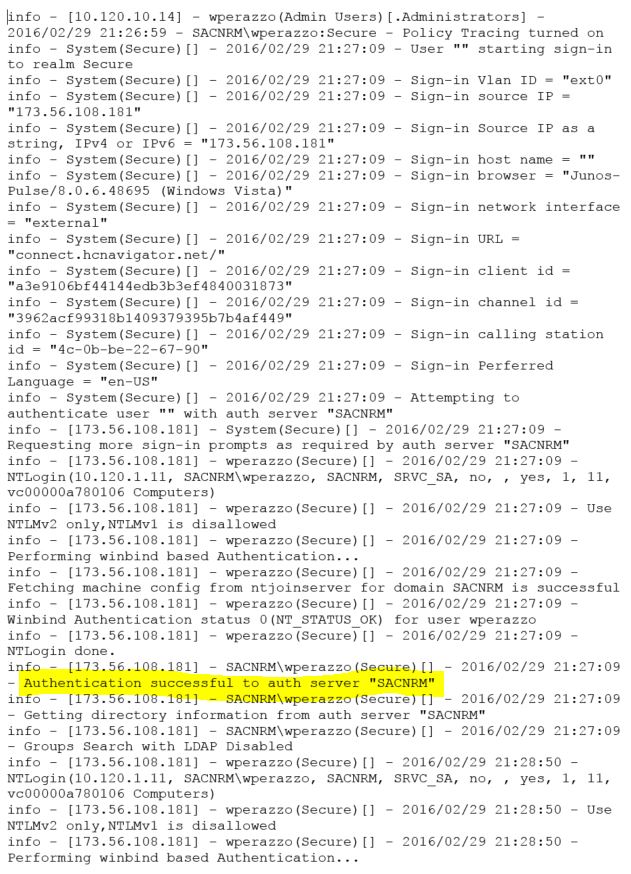
Our remote access VPN utilizes an old Juniper SA4500 appliance in the colo space.  Employees use either the Junos Pulse desktop application or a web-based option to connect.  I turned on session logging on the appliance and reproduced the issue myself.  Here are excerpts from the resulting log.

VPN Log 1

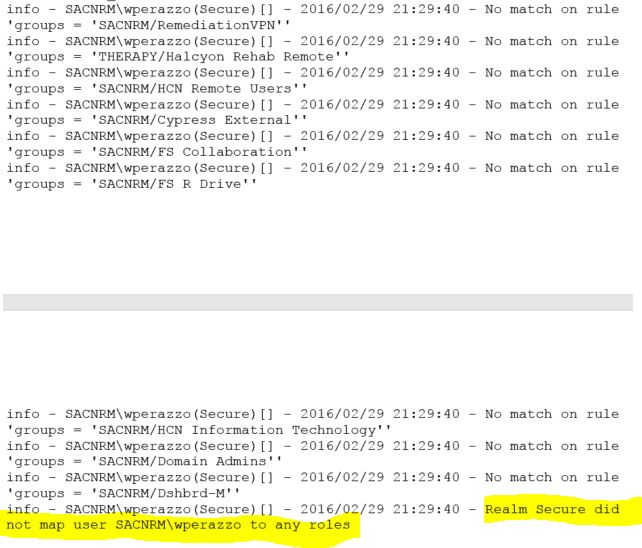
VPN Log 2

The first highlighted line shows that I was authenticated successfully to a domain controller.  The second highlighted line reveals the problem.  My user account did not map to any roles.  Roles are determined by Active Directory group membership.  There are a couple points in the log where the timestamp jumps a minute or more.  Both occurrences  were immediately proceeded by the line “Groups Search with LDAP Disabled”.

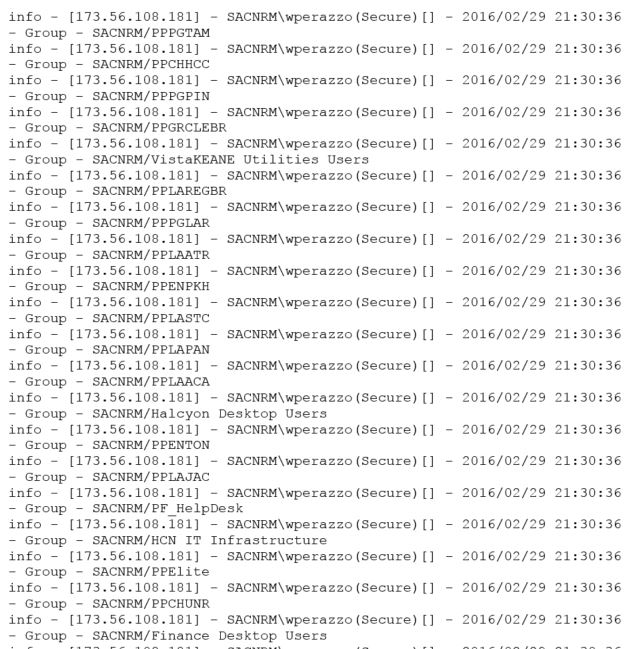
A later log, when the problem was not manifesting itself, yielded this output.

VPN Log 3

There are many lines enumerating my user account group membership.  After this, it maps me to my proper roles and completes the login.  So it appears that the VPN appliance is intermittently unable to enumerate AD group membership.

We had migrated two domain controllers recently to the managed environment.  I made sure the VPN appliance had good network access to them.  We extended our layer 2 network across to the managed environment, so the traffic would not traverse a firewall or even a router.  No IPs changed.  I could not find any issue with the migrated DCs.  Unfortunately the VPN logs did not provide enough detail to determine the root cause of the problem.

As I poked around, I noticed that the VPN appliance had a TCPDump function.  TCPDump is a popular open source packet analyzer with a BSD license.  It utilizes libpcap libraries for network packet capture.  I experimented with the TCPDump function by turning it on and reproducing the problem.  The VPN appliance will then produce a file when the capture is stopped.  This is when I enlisted Wireshark – to open and interrogate the TCPDump output file.  The TCPDump file, as expected, contained all the network traffic to and from the VPN appliance.  It should be noted that I could have achieved a similar result by mirroring the switch port connected to the internal port of the VPN appliance and sending the traffic to a machine running Wirehark.  Having the capture functionality integrated right into the VPN appliance GUI was just more convenient.  Thanks Juniper!

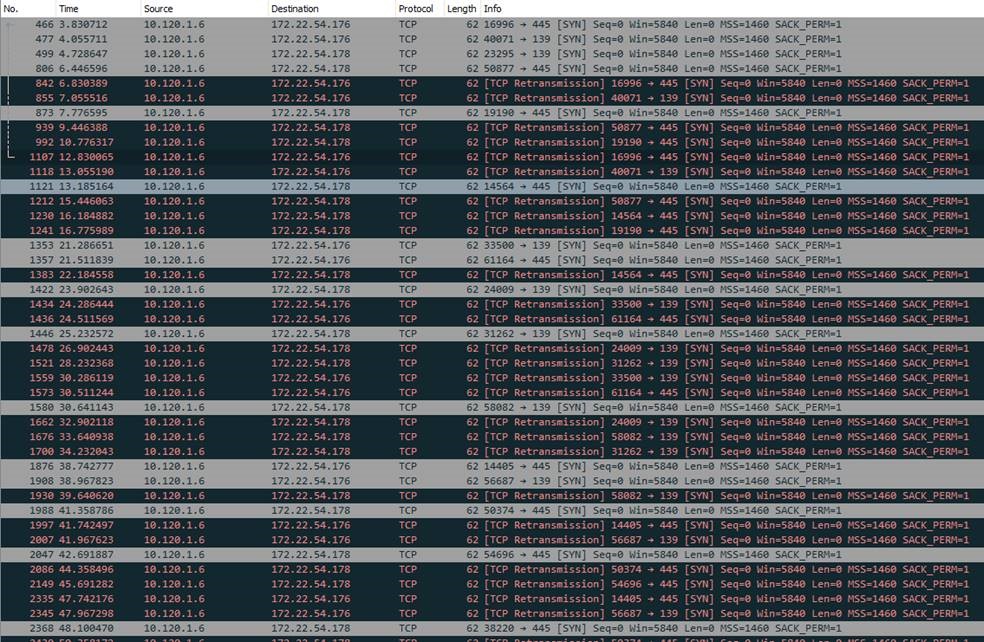
I was able to basically follow along the sequence I observed in the VPN client connection log, but at a network packet level.  Hopefully this level of detail would reveal something I couldn’t see in the other log.  As I scrolled along, lo and behold I saw the output in the excerpt below.

SA4500 TCPDump Excerpt

The VPN appliance is sending and re-transmitting unanswered SYN packets to two IPs on the 172.22.54.x segment.  “What is this segment?”  I thought to myself.  Then it hit me.  This is the new management network segment.  Every VM we migrate over gets a new virtual NIC added on this management segment.  I checked the two migrated domain controllers, and their management NICs indeed were configured with these two IPs.  And there is no way the VPN appliance would be able to reach these IPs, as there is no route from our production network to the management network.  The new question was WHY was it reaching out to these IPs?  How did it know about them?  And that’s when I finally checked DNS.

Bad Facility LDAP Entry (Redacted)

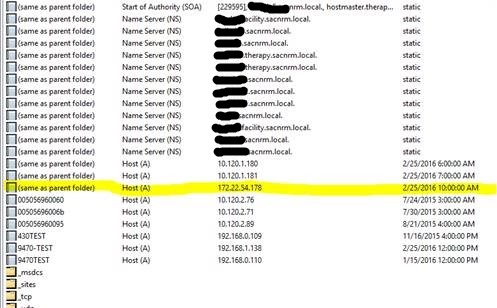
This is the zone corresponding to one of the migrated DCs.  I’ve redacted server names.  As you can see the highlighted entry is the domain controller’s management IP.  The server registered it in DNS as a glue record.  Any host doing a query for the domain name itself, in this case therapy.sacnrm.local, has a one in three chance of resolving to that unreachable management IP.  Then I found this.

Bad GC Entry.png

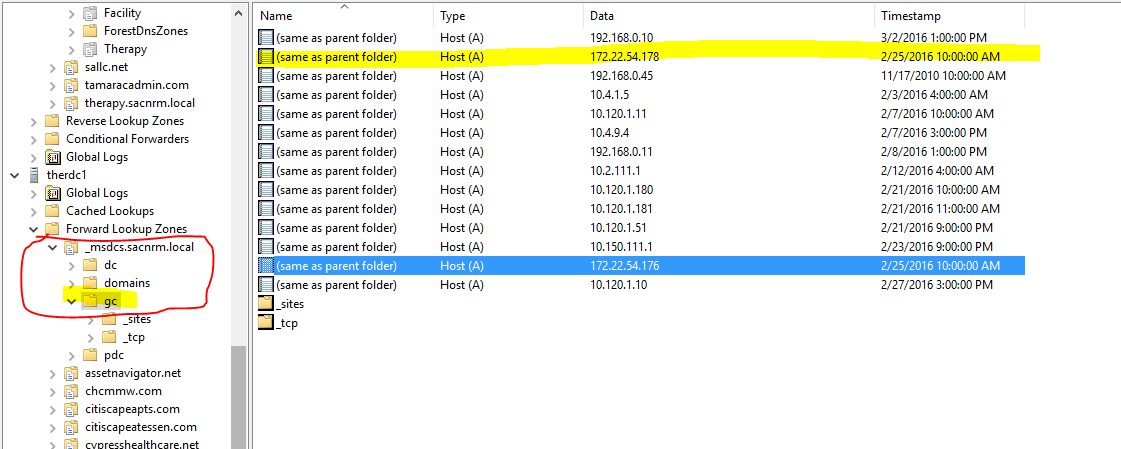
The servers were also registering the management IPs as global catalogs for the forest.  This was what was tripping up the VPN appliance.  It was performing a DNS lookup for global catalogs to interrogate for group membership.  The DNS server would round-robin through the list and at times return the management IPs.  The VPN appliance would then cache the bad result for a time and no one could connect because their group membership could not be enumerated and their roles could not be determined.  This is a good point in the series of events to share a dark secret.  When I’m working hard troubleshooting an issue for hours or days, there is a small part of me that worries that it’s really something very simple.  And due to tunnel vision or me being obtuse, I’m simply missing the obvious.  I would feel pretty embarrassed if I worked on an issue for two days and it turned out to be something simple.  It has happened before and this is where a second or third set of eyes helps.  At any rate, this was the point when I realized that the issue was actually somewhat complicated and not obvious.  What a relief!

For my next move I tried deleting the offending DNS records, but they would magically reappear before long.  Having now played DNS whack-a-mole, I do not think it would do well at the county fair.  I’d rather shoot the water guns at the targets or lob ping pong balls into glasses to win goldfish.  My research led me to learn that the NetLogon service on domain controllers registers these entries and will replace them if they disappear.  Here’s a Microsoft KB article on the issue.  There is a registry change that prevents this behavior.  We had to manually make this change on our DCs to permanently resolve the issue.

So this was a couple days of my life earlier this year.  I was thrilled to figure this out and restore consistent remote access.  Of course in hindsight I wish I had checked DNS earlier.  And I was a bit disappointed that our managed infrastructure team was not familiar with this behavior.  But it was a great learning experience and Wireshark surely saved my bacon.  Time for a much deserved Dos Equis!  Stay thirsty my friends.