
I’m not a big fan of printing and working with paper. I like to keep my desk and drawers free of clutter. A number of years ago I worked for a municipal government. I’ll never forget the first time I laid eyes on the desk of one of our building inspectors. It was entirely covered in a disorganized blob of papers several inches tall. Whatever was on the bottom of that mess is likely still there. Obviously the experience stuck with me.
A few weeks ago I was VERY surprised to find out one of our print servers decided, in spite of its nature, that my way is the better way, the way of the future. It respectfully refused to honor the requests of our staff to use consumables and contribute to deforestation. While the print server earned my respect and admiration for its idealistic stand, I had to dash its dreams. For it is the sysadmin’s responsibility to keep the toner and paper fusing as it were.
I was first informed of the issue by the IT Support team late one afternoon. People were reporting that their printers had disappeared in Citrix. I took a look at their print server (called PS01) which is used by around 1,500 people. When I first terminal’d in the spooler was running. But upon inspection of the server logs I could see that the spooler was crashing every 1 to 5 minutes. After each crash our monitoring software would dutifully detect the failure and restart the spooler. Then it would again crash. Windows Event Viewer unfortunately did not provide any specifics regarding the cause.
My first instinct was to clear all files out of the spool folder (C:\Windows\System32\spool\PRINTERS). Often these repeated spooler crashes are caused by a print job which bugs out the driver. Not this time. My next move was to reach out to Support to see if anyone installed a new printer that day and to reboot the server. The spooler continued to crash after reboot. But I got a response back from one of the Support Analysts who installed a printer earlier in the afternoon. I had noticed in Event Viewer that she had logged onto the server a few hours earlier. I deleted the printer she had installed, but again no joy. By this time it was well after 5:00. I turned on logging of all print events including informational events in the print server properties. I figured I could then check the logs to see which print job crashed the spooler. I soon came to the realization that the spooler would crash regardless of print activity. It would crash every few minutes even if no jobs were being processed.
At this point I got desperate and resorted to attaching a debugger to the spoolsv.exe (print spooler) process. I used adplus from the Windows Debugging Tools as described in this article. I waited a couple minutes for the spooler to crash and then examined the log file file. Unfortunately the file made no reference to a print driver or any cause of the crash. The adplus tool also left a bunch of dump (.dmp) files behind. I fed some of these into Windbg. No cause identified. I repeated this process again with another crash. The resulting log files were similarly unhelpful. This is getting ridiculous, I thought to myself.
I had taken a break to drive home and eat dinner. So now it was quite late in the evening. I decided to call and open a ticket with Microsoft and continue to work on the problem while waiting for a callback from an engineer. After getting off the phone I finally turned to my #1 favorite Windows diagnostic tool….. Process Monitor. This tool was developed by Mark Russinovich and the Sysinternals team. They were acquired by Microsoft a couple years ago. Process Monitor captures all file system, registry, network and process activity on a system. I ran it until the spooler crashed. I then filtered to only show output which includes the spoolsv.exe process. I scrolled to the time of the crash and here’s what I saw.
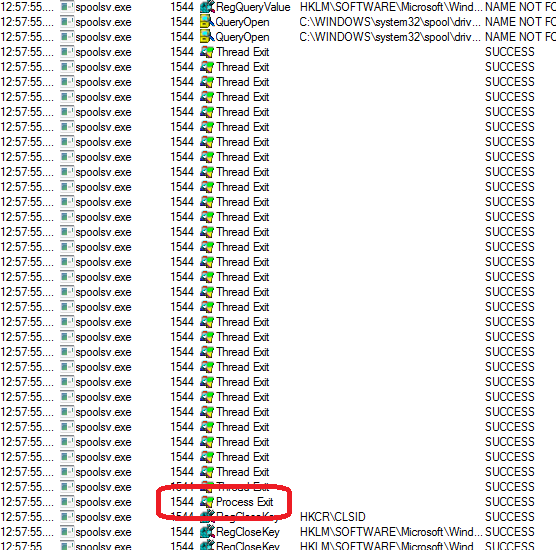
You can see here where the process is exiting. Now all I had to do was scroll up and see what it was doing just prior to the crash. Lo and behold I observed MANY lines referencing a particular printer and driver.
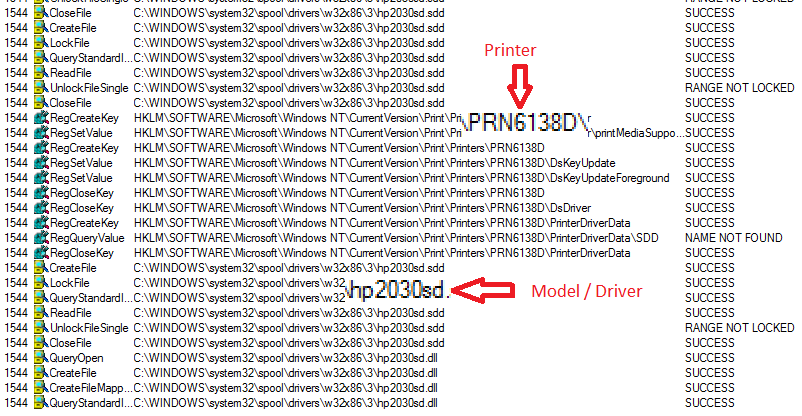
I saw hundreds of lines just prior to the crash which referenced a particular HP LaserJet 2030 series printer. In Server Manager I sorted the printer list by driver and observed that this was the only printer on the server using this particular driver. So I assume someone installed this printer earlier in the day and loaded the new driver. I tried to look at the properties of the printer, but the window would freeze when I tried to bring the properties up. So I deleted the printer and removed the driver through the Print Server Properties. The crashes ceased.
Apparently the print spooler is very active in the background. It seems to cycle through the registry looking for printers and it re-enumerates the printers on the machine. Every time it hit this particular printer, CRASH!!! In hindsight I should have thought to use Process Monitor before going through the trouble of attaching a debugger. But hey it was an educational experience. Needless to say this incident DID NOT improve my relationship with printers. One of these days I will write a post about our myriad issues surrounding printing in Citrix……
 brute force IT